
Access InstantPackageFinder
Simply click on the floating button on the bottom right corner of your browser to open the menu.
Your extension is installed and ready. This page walks you through everything - how to manage it, what it does, and answers to the most common questions.
Three steps. No jargon. We’ll have you tracking your first shipment before you finish reading this page.
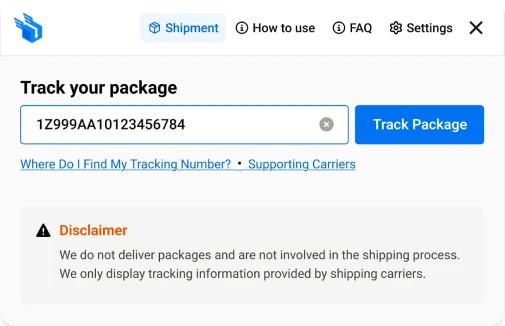
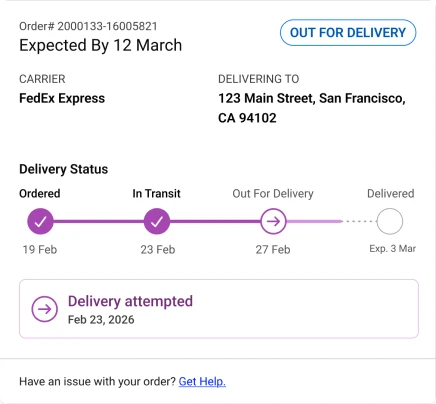
Within couple of seconds your package’s full journey appears. Not just “In Transit” - the actual stage, location, timestamp, and estimated delivery window.
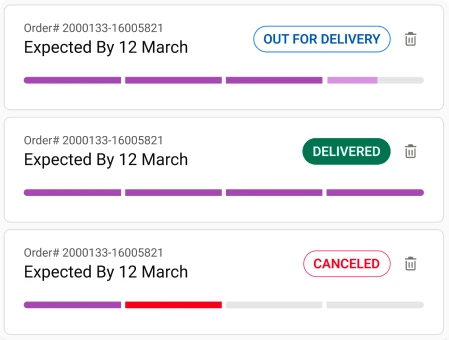
We save every tracking number you enter. No setup. No folder to manage, Every package you’ve ever searched is right there, updated and waiting.
Quick, clear answers to help you move forward with confidence, so you can make decisions without second-guessing.
This extension allows you to track the status of a shipment using a tracking number. It collects and displays tracking updates from supported shipping carriers in one place.
No. We do not deliver packages and are not involved in the shipping process. We only display tracking information provided by shipping carriers.
If your package is marked as delivered but you have not received it, please contact the shipping carrier or the seller/merchant directly. They are responsible for investigating delivery issues.
Unfortunately, we cannot influence delivery times or resolve delays. Delivery status is controlled entirely by the carrier. We recommend contacting the carrier’s customer support for further assistance.
We support a wide range of carriers, including major providers such as DHL, FedEx, UPS, USPS, and others. The list of supported carriers depends on the data available through our tracking API and may change over time.
Possible reasons include:
Tracking updates may sometimes be delayed or displayed differently due to carrier system updates, time zones, or data synchronization. For the most accurate information, always refer to the official carrier website.
No. We do not have the ability to contact carriers or open delivery claims. Only the sender, recipient, or seller can usually initiate an investigation.
We rely on third-party carrier data. While we strive to provide accurate and up-to-date information, we cannot guarantee the completeness or accuracy of tracking updates.
Please contact: The shipping carrier, or the seller or online store where you placed your order. They are responsible for lost or missing shipments.
Whether you want to adjust settings, turn features on or off, or remove the extension at any time, everything is easy to access and simple to manage.
Simply click on the floating button on the bottom right corner of your browser to open the menu.
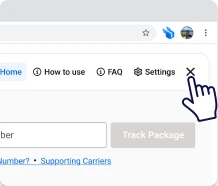
To minimize the menu of widgets by clicking on the logo to bring it back to a floating button.
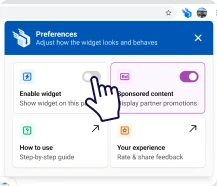
To remove the floating button from your browser, click on the extension icon located at the top right of your browser toolbar and turn toggle OFF for Enable widget.
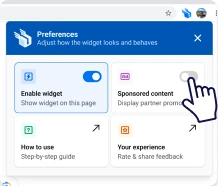
In order to disable sponsored content to show up, click on the extension icon located at the top right of your browser toolbar and turn toggle OFF for Sponsored content.
The extension is free, the setup is done in one click, and the risk is literally zero.